
[ ENTERING_THE_SAFE_DESK ]
BVT SAFE TASK Security · Task Manager · Child Lock See everything your PC is doing.
- 5 $SCAN_ENGINES
- 19 $BEHAVIOUR_RULES
- 2078 $MALWARE_PATTERNS
- 0 $ACCOUNTS_NEEDED
"See it. Check it. Then you decide."
BVT SAFE TASK checks your files with five scan engines, watches what programs do, and shows every process, service and startup app like Windows Task Manager, with more detail. It adds a Child Lock, a crypto wallet guard and a network guard. It works next to your antivirus and warns you first: a program is ended, a file removed or a setting changed only when you press the button.
Free · No account · No card · Windows 10 and 11 · Built by BitVault
SCROLL_TO_ENTER[ /SCAN_DESK ]
The scan desk
Every file a scan flags gets a second opinion. The pattern engine, Microsoft Defender, the online lists and the behaviour rules each give their answer, side by side, so one engine's mistake does not decide alone.
Example files. In the app, Microsoft Defender only reports here: it does not move or delete the file. You press Quarantine, and you can put a file back. A miner on your own allowed list stays quiet.
[ /HOW_IT_PROTECTS ]
Five layers
Attackers come in through a download, a USB stick, a pasted command, a remote-control app or a fake wallet address. Each way in has its own guard, and all of them report to one notification center.
- ◆ Layer 1
/HYBRID_SCAN/
Scan with five engines
2,078 malware patterns (YARA-X), Microsoft Defender's verdict, an online fingerprint lookup, 19 behaviour rules and a check of every running program.
⚡ Quick · full · custom✓ Quarantine and restore - ◆ Layer 2
/REAL_TIME/
New files, checked at once
Downloads, Desktop, the Startup folder and USB drives are watched. A new file that matches a pattern raises an alert with a Quarantine button.
⚡ Real-timeUSB - ◆ Layer 3
/BEHAVIOUR/
Caught by what it does
Deleting backup copies, copying sign-in secrets, switching Defender off, fake Windows programs and files renamed by the hundred: each one has a rule.
⚡ 19 rulesCritical alerts - ◆ Layer 4
/NETWORK/
Who talks to the internet
Every connection with its country and owner, known botnet addresses, remote-control apps and mining ports, plus a firewall to block one program.
⚡ LiveFirewall - ◆ Layer 5
/WALLET/
Crypto wallet guard
Warns when a copied wallet address is swapped, checks token permissions and hidden wallet control, and finds recovery words saved in files.
⚡ Clipboard✓ Never asks for keys
CRITICALBackup copies of Windows are being deleted
vssadmin.exe Delete Shadows /All · started by invoice.pdf.exeHIGHA new file matches a malware pattern
Downloads\free-game-setup.exe · Defender agreesMEDIUMA program was started like a crypto miner
If it is your own miner, put it on the allowed listINFOQuick scan finished: nothing found
18,234 files · ran in the background[ /BEHAVIOUR_RULES ]
Caught in the act
The behaviour rules watch every new program and its command, the internet use of fresh downloads, new auto-starts and very fast file changes. Alerts reach the notification center, the icon next to the clock and, if you want, your phone.
- Backup copies deleted, sign-in secrets copied or hundreds of files renamed in seconds: a Critical alert that gets through quiet hours.
- Defender or the firewall switched off, Remote Desktop switched on or a new administrator added: you hear about it at once.
- Scans and checks keep running in the background when you open another page or close the window.
- Alerts only: the rules never stop a program by themselves. Each rule has its own switch, and your own miner can go on an allowed list.
[ /TASK_MANAGER ]
A Task Manager that explains
All the tabs of Windows Task Manager, with the details Windows keeps hidden and plain words for what each program is and who made it.
- Processes, Performance, App history, Startup apps, Users, Details and Services, with CPU, memory, disk, network and GPU for every program.
- CPU, GPU, memory, disk and network graphs, GPU and disk temperatures, and a Cooling Mode for a hot laptop.
- End a task, change its priority or efficiency mode, and open where its file is.
- The description and maker of each program in plain words, so a stranger in the list stands out.
[ /CHILD_LOCK ]
Child Lock
Lock any program that is not for children: a game, a browser, a chat app. When it starts, a password window opens over it. Give free time on set days and hours with a daily limit, or answer from your phone.
- 1 password
- For every locked programlocked by name, folder, publisher or exact file, so a renamed copy is caught too
- Daily limits
- Free time you setset days and hours, minutes per day and a warning 5 minutes before time ends
- 1 tap
- Answer from your phoneyour own Telegram bot asks: allow it for a while, or keep it locked
[ /SOFTWARE ]
The software itself
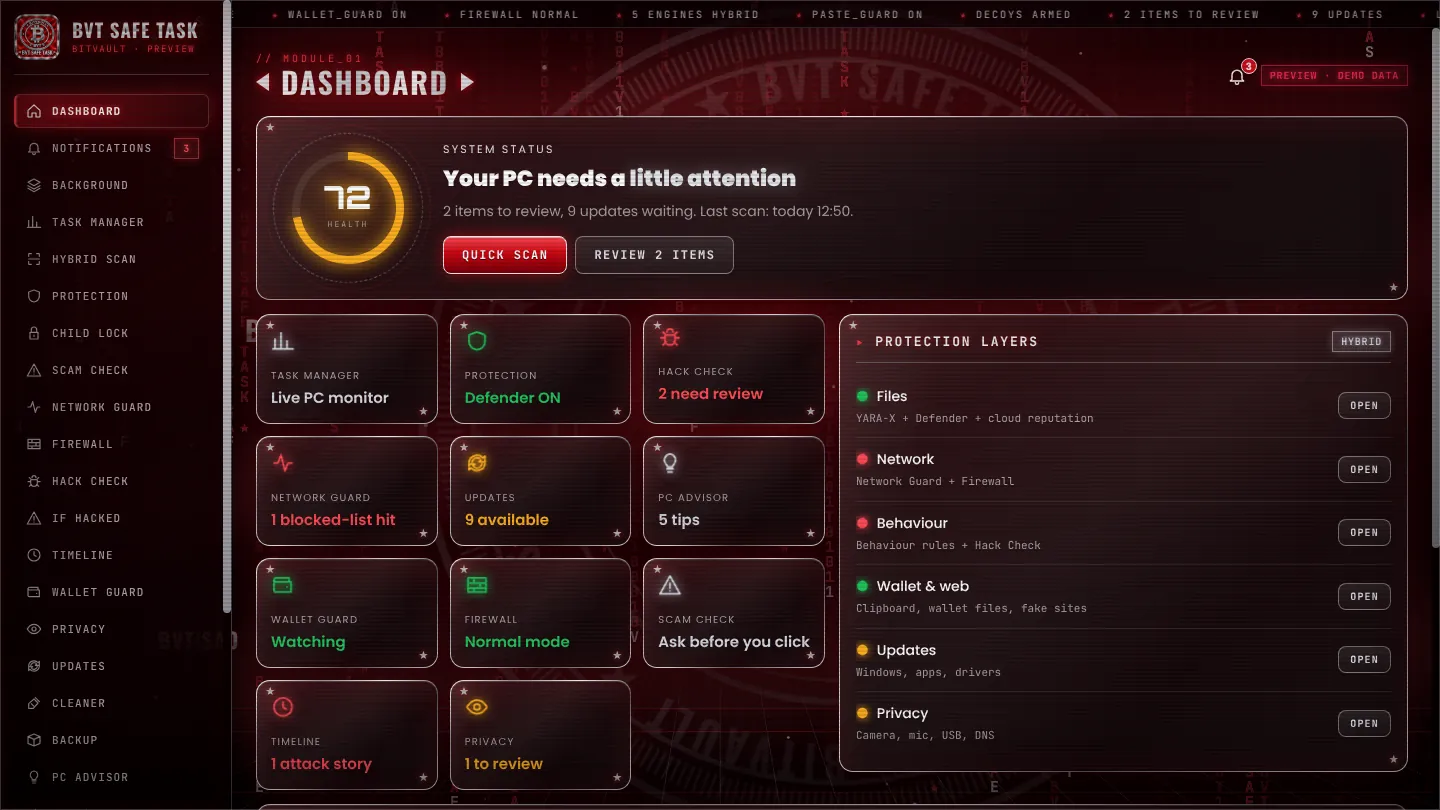
Real screens from the Windows app, shown with example data.
[ /PRICE ]
Free to use
BVT SAFE TASK is free to download and use, at home or at work. There is no account, no card, no advertising and no tracking.
Download
Free
one portable file, 120 MB
Account
None
nothing to sign up for
Your files
0
uploaded to BitVault
Scans run on your PC
Every feature
Free
scan, Task Manager, Child Lock, guards
All 25 pages
The online checks are optional and send as little as possible: a file's fingerprint for the reputation lookup, public phishing lists for Scam Check, the alert title for phone alerts. VirusTotal and MalwareBazaar lookups need your own free key.
The full list of what the app may contact, and when, is on the privacy page.
[ /PLATFORMS ]
Your PC and your phone
BVT SAFE TASK runs on your Windows PC and keeps watching from next to the clock when the window is closed. Your phone only gets the alerts you choose, through your own Telegram bot or ntfy.
/WINDOWS/
Windows app
Windows 10 and 11, 64-bit. One portable file: no installer, and the settings stay on this PC.
Download for Windows/PHONE_ALERTS/
Alerts on your phone
Choose which alerts go to your phone, from High or only Critical. Only the alert title is sent, with a daily limit.
How to set it up/CHILD_LOCK/
Answer from the phone
When a locked program starts, your Telegram asks you. One tap allows it for a while or keeps it locked.
▶ See Child LockCRITICALMany of your files are being renamed or changed very fast
HIGHMicrosoft Defender was switched off
Child Lock: "Roblox" wants to start on HOME-PC.
Keep locked
[ /FAQ ]
Questions
Does it replace my antivirus?
No. BVT SAFE TASK is a companion. It works next to Microsoft Defender or the antivirus you already have, and it never switches your antivirus off or changes its settings. When another antivirus is in charge and Defender is off, the app says so and its other engines keep checking.
Why does Windows show a warning when I open it?
The file is not code-signed yet, so Windows SmartScreen may say "Windows protected your PC". Download it only from this site and check its SHA-256 fingerprint on the download page. Then choose More info and Run anyway. Signing is being set up.
Does it upload my files?
No. Every scan runs on your PC. The optional online reputation check sends only a file's fingerprint (a SHA-256 code), never the file, and only after you switch it on. Your passwords, browser cookies and wallet keys are never read or sent.
Does it need administrator rights?
No, it runs as a normal user. A few actions, like starting or stopping a service or adding a firewall rule, need administrator rights. Windows asks you when you press them.
Will it slow down my PC?
Background scans run at low priority, one helper at a time, and pause while you use the PC, play a game or run on battery. A scan you start yourself uses more power so it finishes sooner.
Can my child close it or get around Child Lock?
Closing the app or switching Child Lock off needs the parent password. Like any lock without a driver, a person with administrator rights on the PC could still get around it, so give your child a standard Windows account.
What does it do for crypto users?
It warns when a copied wallet address is swapped by malware, checks the token permissions and hidden control of your wallet addresses, finds files that contain recovery words, and checks links before you open them. It never asks for your recovery words, never signs a transaction and never reads saved passwords.
How do phone alerts work?
In Settings, add your own Telegram bot (a bot token and your chat ID) or an ntfy topic, and choose the lowest level that should reach your phone. Only the alert title is sent, with a daily limit. Child Lock can ask you the same way, with buttons to allow or keep it locked.
How do I remove it?
Switch off Start with Windows in Settings, then delete the file. Your settings and quarantine are in the folder %APPDATA%\BVT SAFE TASK: restore anything you want to keep from Quarantine first, then delete that folder too.
[ /CONTACT ]
Talk to us
A question, a problem with the app, an idea or business use: write to us. We reply by email.